

SubLedger vs. CancelMySub: Which Subscription App Actually Protects Your Privacy?
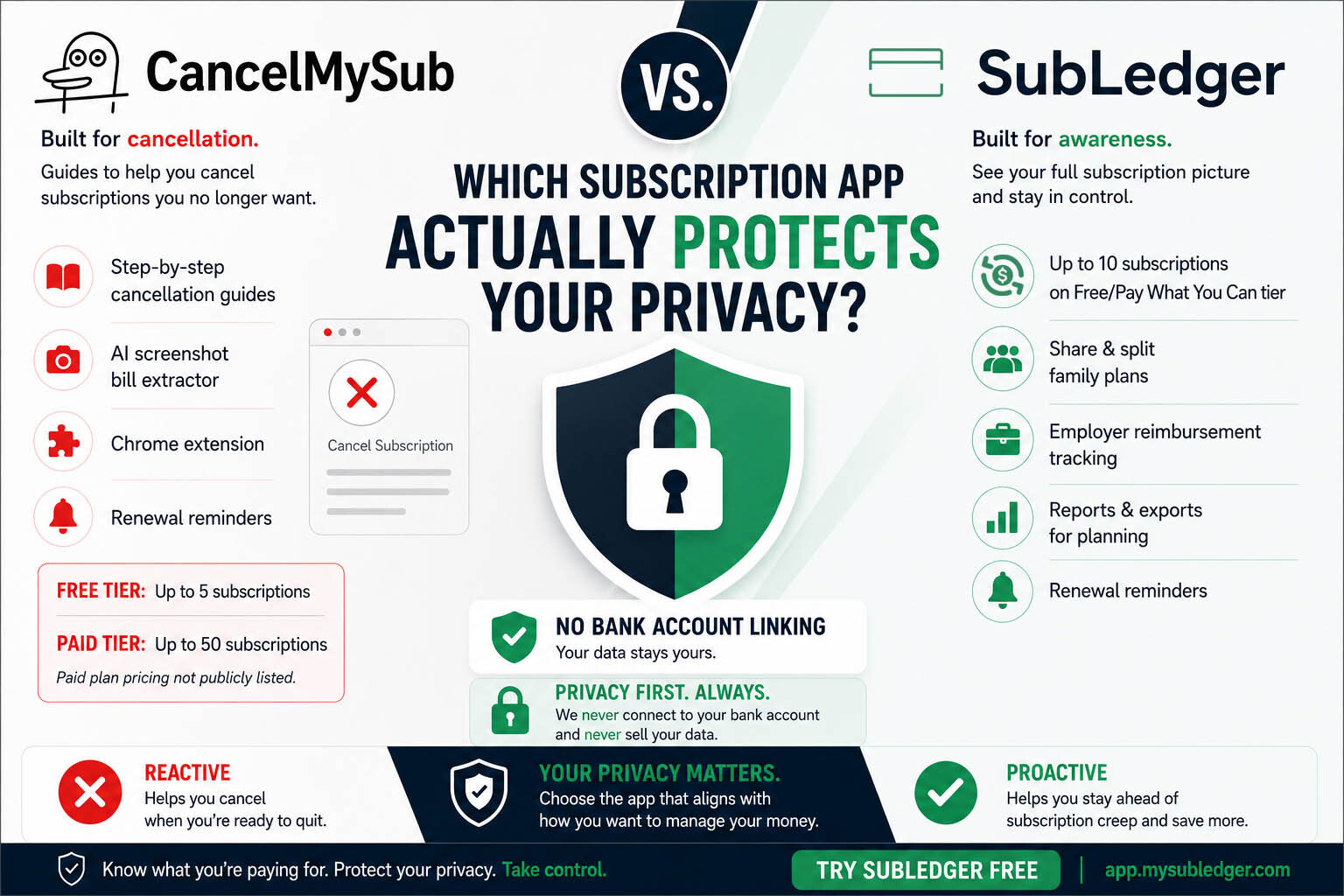
TL;DR
CancelMySub is a useful tool for the moment you're ready to cancel. It provides step-by-step guides, direct cancellation links, and an AI screenshot extractor. But its free tier caps at 5 subscriptions, its paid pricing isn't publicly listed, and its privacy commitments are less explicit than SubLedger's.
SubLedger is built for ongoing subscription awareness: unlimited tracking, family plan splitting, employer reimbursement flags, and a firm public commitment to never selling your data. If privacy and comprehensive tracking matter to you, SubLedger is the clearer choice.
Why You're Searching for a Subscription Management App
You found an unexpected charge on your statement. Or you're paying for three streaming services you forgot you had. Or you just want a clear picture of where your money goes every month without linking your bank account to yet another app.
CancelMySub.app and SubLedger both show up in the conversation around subscription management — but they solve different problems. Understanding which one fits your actual need could save you time, money, and a lot of unnecessary privacy exposure.
What Is CancelMySub?
CancelMySub is a startup subscription tool built around one core idea: making it easier to cancel subscriptions. The app provides step-by-step cancellation guides for popular services, direct cancellation links, and renewal reminders. It also includes a Chrome extension and an AI-powered screenshot extractor that reads uploaded bill images to identify subscriptions automatically.
CancelMySub leans into a privacy-friendly framing. Their FAQ explicitly states they won't act on your behalf when canceling, positioning hands-off guidance as a privacy feature.
CancelMySub Pricing
| Plan | Price | Subscription Limit |
|---|---|---|
| Free | $0/mo. | Up to 5 subscriptions |
| Paid | Not publicly listed | Up to 50 subscriptions |
| Chrome Extension | Included | Browser-based tracking |
Note: CancelMySub does not publish its paid plan pricing publicly. You must sign up to see current rates.
What Is SubLedger?
SubLedger is a privacy-first subscription tracking app built for people who want complete visibility into their recurring payments without connecting a bank account, without selling their data, and without a third party making decisions about their finances.
SubLedger was built because its founder experienced an unexpected subscription charge firsthand. The guiding principle: you should always know exactly what you're paying for, and that knowledge shouldn't come at the cost of your financial privacy.
SubLedger's only financial integration is Stripe, used exclusively for processing paid plan subscriptions. No bank account data is ever collected.
SubLedger Pricing
| Plan | Price | Subscriptions | Key Features |
|---|---|---|---|
| Free or Pay What You Can | $0/mo. | Up to 10 | Renewal reminders, dashboard & summaries |
| Personal | $10/mo. | Up to 20 | All Free features, employer reimbursement tracking |
| Family | $20/mo. | Up to 50 | All Personal features, assign subscriptions to family members, shared cost tracking |
| Business | $50/mo. | Unlimited | All Family features, custom categories, bookkeeper access, downloadable reports |
Head-to-Head: The Key Differences
1. Core Purpose: Cancellation Guides vs. Subscription Awareness
CancelMySub is built for one moment: when you've already decided to cancel something and need help doing it. Their cancellation guides walk you through the exact steps to terminate a specific service, and direct links take you straight to the cancellation page. It's useful but reactive.
SubLedger is built for ongoing visibility. Instead of waiting until you're frustrated enough to cancel, SubLedger gives you a dashboard of every subscription you're paying for, what it costs, when it renews, and whether it's shared with family members or covered by your employer. The goal is to surface the subscriptions worth canceling before they become a problem.
If you already know exactly what you want to cancel, CancelMySub has a useful library of guides. If you want to understand your full subscription picture and catch the ones you've forgotten, SubLedger is built for that.
2. Privacy & Data Practices
CancelMySub frames privacy as a core value, stating they won't act on your behalf when canceling. That's a meaningful commitment. It means they're not intercepting your accounts or credentials. However, CancelMySub's privacy policy is a standard legal template that does not make explicit commitments about data selling, third-party sharing for advertising, or data monetization. The paid plan's pricing is not publicly disclosed, which leaves open questions about their business model and how they generate revenue.
SubLedger takes a different approach: privacy is the product, not just a policy. SubLedger never connects to your bank account, never collects financial credentials, and has made a public commitment to never sell user data. The only financial integration is Stripe, used only to process SubLedger subscriptions. Your subscription list stays yours.
When your financial data is involved, the question isn't just "do they say they protect privacy?" It's "how do they make money, and does that model depend on your data?" SubLedger's answer is transparent: paid subscriptions. CancelMySub's answer is less clear.
3. Subscription Tracking Features
CancelMySub's free tier limits you to 5 subscriptions, which is quickly outgrown for most households managing a realistic mix of streaming, software, fitness, news, and other services. The paid tier extends this to 50 subscriptions, and the AI screenshot extractor can read bill images to identify recurring charges. The Chrome extension adds browser-based tracking.
SubLedger is built around comprehensive tracking from the ground up. You can track unlimited subscriptions across all paid tiers, organize them by category, see monthly and annual cost summaries, and set renewal reminders. Two features stand out: the "Shared with others" toggle lets you split family plan costs accurately, and the "Employer reimbursement" flag separates work-covered subscriptions from personal expenses, a detail that matters at tax time and for real household budgeting.
SubLedger also generates reports and exports, making it useful not just for awareness but for financial planning conversations.
4. Target User
CancelMySub is designed for the person in a specific moment of frustration. You've spotted a charge, you know you want out, and you need a faster path to the cancel button. The cancellation guide library is the strongest part of the product.
SubLedger is designed for the person who wants to stay ahead of subscription creep, the gradual accumulation of recurring charges that quietly drain your account month after month. It's also built for households with complexity: families splitting streaming costs, professionals with employer-reimbursed tools, and anyone who wants a clean record of their recurring financial commitments.
5. Pricing Transparency
One of the more unusual aspects of CancelMySub is that their paid plan pricing is not publicly listed. You have to create an account to see what you'd pay. That's an unusual choice for a consumer app, and it raises a reasonable question about what the product costs and how the free tier is subsidized.
SubLedger's pricing is published openly at every tier. No surprises, no hidden costs, no need to sign up before you know what you're paying.
Feature Comparison at a Glance
| Feature | SubLedger | CancelMySub |
|---|---|---|
| Bank account linking required | ❌ No | ❌ No |
| Privacy / no data selling | ✅ Explicit commitment | ⚠️ Policy unclear |
| Subscription tracking | ✅ Unlimited (paid tiers) | ⚠️ Up to 5 (free) |
| Cancellation guides | ❌ Not the focus | ✅ Yes |
| Renewal reminders | ✅ Yes | ✅ Yes |
| AI screenshot import | ❌ No | ✅ Yes |
| Chrome extension | ❌ Web app | ✅ Yes |
| Family plan splitting | ✅ Yes | ❌ No |
| Employer reimbursement tracking | ✅ Yes | ❌ No |
| Reports & exports | ✅ Yes | ❌ No |
| Transparent public pricing | ✅ Yes | ❌ No |
| Stripe-only financial integration | ✅ Yes | ⚠️ Unknown |
Which Tool Is Right for You?
Choose SubLedger if:
- You want a complete, ongoing picture of every subscription you're paying for
- Privacy is non-negotiable — you want a clear commitment that your data will never be sold
- You share subscriptions with family members and need accurate cost splitting
- You have employer-reimbursed subscriptions and want to separate them from personal expenses
- You want transparent pricing before you sign up
- You want reports and exports for budgeting or financial planning
Choose CancelMySub if:
- You know exactly what you want to cancel and need step-by-step instructions
- You want a Chrome extension to help you catch subscriptions while browsing
- You want AI-powered bill scanning to identify charges from uploaded screenshots
- You have 5 or fewer subscriptions to track (free tier)
Sources
The following sources were used in the research and preparation of this article. SubLedger’s payment processing is handled exclusively through Stripe (stripe.com). SubLedger does not link to or store bank account information.
- CancelMySub FAQ: https://cancelmysub.io/
- CancelMySub Terms of Service: https://cancelmysub.io/terms-of-service
- SubLedger Privacy Commitment: https://mysubledger.com
See Your Full Subscription Picture Without Giving Up Your Privacy
SubLedger gives you what CancelMySub's guides can't: a complete, ongoing view of every recurring charge you're paying for without bank linking and data selling.
TRY SUBLEDGER FREEFAQ
Does CancelMySub link to your bank account?
CancelMySub does not require bank account linking. You can add subscriptions manually or by uploading screenshots of your bills, which the AI extractor processes. This is a positive privacy feature. SubLedger also does not link to your bank account and goes further with an explicit commitment to never sell your financial data.
How many subscriptions can you track on CancelMySub for free?
The free tier on CancelMySub allows up to 5 subscriptions. Their paid plan increases this to 50, but pricing for the paid plan is not publicly listed. You need to create an account to see current rates.
Can CancelMySub cancel subscriptions on your behalf?
No, CancelMySub explicitly states they will not act on your behalf. Their model is to guide you through the cancellation process with step-by-step instructions and direct links, rather than accessing your accounts or handling cancellations for you.
What makes SubLedger different from CancelMySub?
SubLedger is focused on ongoing subscription awareness rather than cancellation assistance. Key differences include: SubLedger explicitly commits to never selling user data; SubLedger includes family plan cost-splitting and employer reimbursement tracking; and SubLedger publishes all pricing transparently before you sign up.
Is SubLedger free?
SubLedger offers a free tier. Paid plans start at $10/month for Personal, $20/month for Family, and $50/month for Business. All pricing is publicly listed at mysubledger.com.