

SubLedger vs. ReSubs: Which Subscription Tracker Is Actually Private?
What Is ReSubs?
ReSubs is a subscription tracking app available on iOS and Android with 18,000+ users and 50,000+ subscriptions tracked across 20+ countries. It offers manual entry, renewal reminders, spending analytics, cancel guides, a preset library of 461 common services, and an optional Gmail import feature that scans your inbox for subscription-related emails.
ReSubs markets itself as privacy-first, citing that subscription data stays on your device and no bank account access is required. It is based in Berlin, Germany, and subject to GDPR.
TL;DR
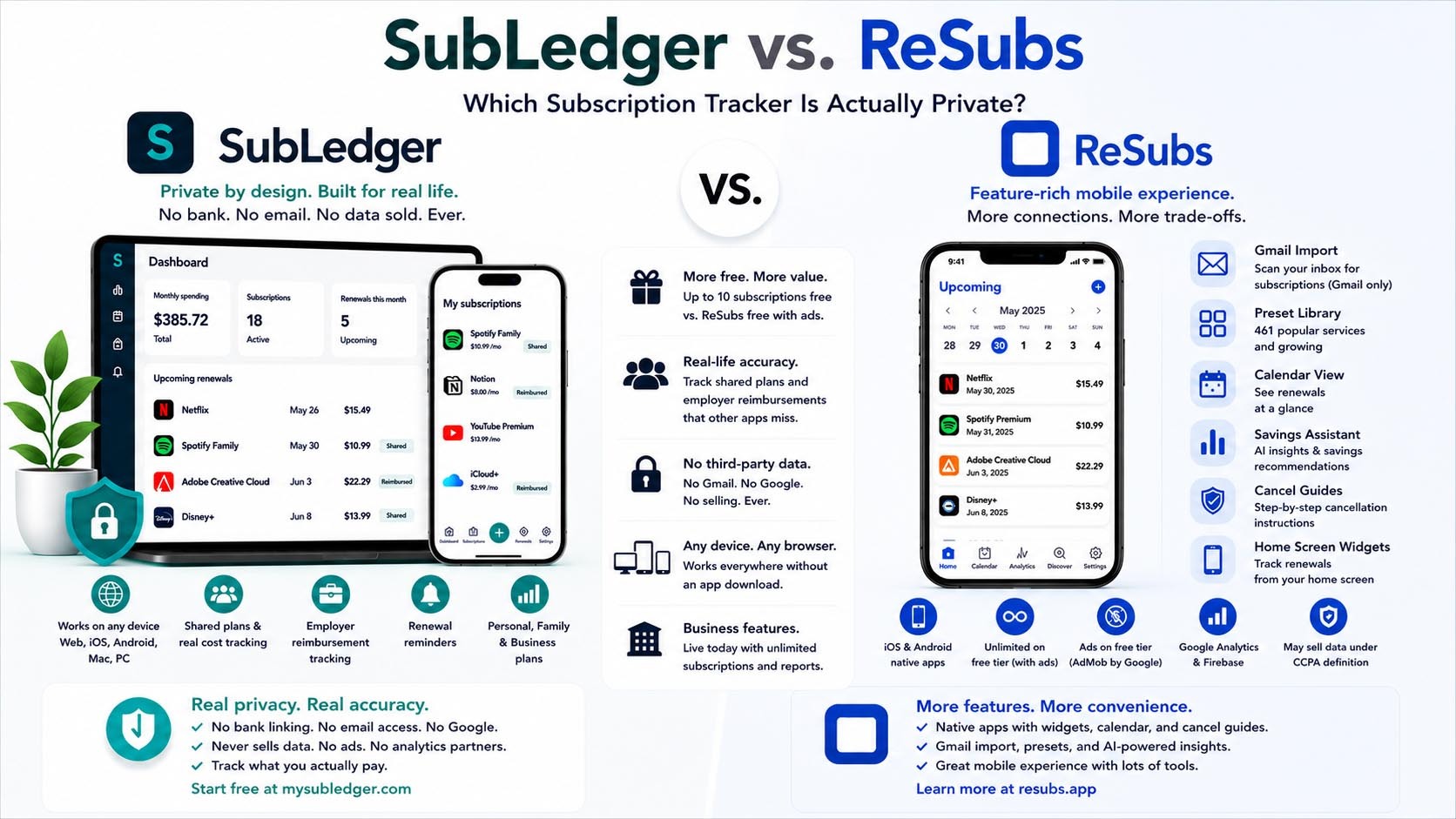
- ReSubs markets itself as privacy-first but uses Google Analytics, Firebase, and AdMob, and its own privacy policy acknowledges potential data selling under CCPA definitions.
- ReSubs’ Gmail import feature requires inbox access and only works for Gmail users — everyone else gets no benefit.
- SubLedger uses no Google services, shows no ads, and never sells data under any definition.
- ReSubs wins on native mobile experience, presets, widgets, and cancel guides.
- SubLedger wins on privacy, shared plan tracking, employer reimbursements, and zero third-party data relationships.
Resubs Pricing
| Plan | Price | Key Features |
|---|---|---|
| Free | $0 | Basic tracking, preset library, renewal reminders (with ads) |
| Premium (monthly) | Varies by region | Unlimited features, no ads, Gmail import, savings assistant |
| Premium (lifetime) | One-time purchase | Everything in premium, all future updates |
What Is SubLedger?
SubLedger is a privacy-first subscription tracker built on one principle: you should be able to manage your subscriptions without handing over access to your bank account, your email inbox, or your Google account. No third-party data collection. No ads. No Gmail required.
SubLedger’s only payment integration is Stripe, used solely to process paid plan subscriptions. No bank account data, no email data, and no social media account data is ever collected or accessed.
SubLedger Pricing
| Plan | Price | Subscriptions | Key Features |
|---|---|---|---|
| Free or Pay What You Can | $0/mo. | Up to 10 | Renewal reminders, dashboard & summaries |
| Personal | $10/mo. | Up to 20 | All Free features, employer reimbursement tracking |
| Family | $20/mo. | Up to 50 | All Personal features, assign subscriptions to family members, shared cost tracking |
| Business | $50/mo. | Unlimited | All Family features, custom categories, bookkeeper access, downloadable reports |
Head-to-Head: The Key Differences
1. The Gmail Import Problem
ReSubs offers an optional Gmail import feature that scans your inbox to automatically detect subscription-related emails. To use it, you grant ReSubs access to your Gmail account using Google’s gmail.readonly OAuth scope. According to their own privacy policy, this access includes your email subjects, sender addresses, and message bodies.
There are two problems with this. First, it only works if you use Gmail. Users on Apple Mail, Outlook, ProtonMail, Yahoo Mail, or any other email provider get no benefit from this feature at all. Second, granting any third-party app access to your Gmail inbox is a significant privacy decision — one that many privacy-conscious users would decline regardless of what the app promises to do with that access.
SubLedger lets you add subscriptions manually, and you can forward subscription receipts and reminders to a dedicated email address for automatic subscription card creation. It takes a few minutes and requires zero access to any external account.
2. Google Is Deeply Embedded in ReSubs
ReSubs’ own privacy policy discloses the following Google integrations: Google Analytics (web tracking and behavioral data), Firebase (app analytics, also by Google), and AdMob by Google (in-app advertising on the free tier). Their privacy policy explicitly states that Google may use collected data to contextualize and personalize ads across its own advertising network.
In practice, this means that using the free version of ReSubs funds the product through Google ad revenue — and that your usage behavior is shared with Google’s advertising infrastructure. If you have concerns about Google’s data practices, ReSubs’ free tier is not a clean option.
SubLedger uses no Google services of any kind. No Analytics. No Firebase. No AdMob. No Google login. SubLedger is funded by user subscriptions processed through Stripe. That’s the only data relationship involved.
3. ReSubs May Sell Personal Data Under CCPA
ReSubs’ privacy policy contains a California-specific disclosure that is worth reading carefully. Under the CCPA/CPRA Sale of Personal Information section, ReSubs states that it may have sold, and may sell, the following categories of personal information: identifiers (name, email, IP address, device identifiers), commercial information (products or services purchased or considered), and internet or network activity.
This isn't an accusation. It's what ReSubs’ own legal document says. The policy notes they “do not sell personal information as the term sell is commonly understood” but then acknowledges that their advertising and analytics partnerships may constitute a sale under California’s broader legal definition.
SubLedger does not sell personal data under any definition. SubLedger does not have advertising partners, analytics partners, or any third-party relationships that involve sharing user data for commercial purposes.
4. Social Login and Third-Party Account Access
ReSubs allows users to register and log in using Google, Facebook, Instagram, Twitter, and LinkedIn. Each of these login methods grants ReSubs access to data from those accounts, potentially including your name, email address, activity, and contact list, depending on the permissions granted.
SubLedger uses Supabase Auth with email/password and Google OAuth. Google OAuth is available as a convenience option, but SubLedger doesn't use the data from that login for advertising, analytics sharing, or any purpose beyond authenticating your identity.
5. What ReSubs Does Better
This comparison would not be complete without acknowledging where ReSubs genuinely leads. With 18,000+ users, native iOS and Android apps, a preset library of 461 services, home screen widgets, a calendar view, cancel guides, and a savings assistant, ReSubs is a more feature-rich mobile experience than SubLedger currently offers. If a native app with a polished mobile UI is your priority, ReSubs has invested heavily in that experience.
The trade-off is the privacy posture described above. You can have the richer mobile experience, but it comes with Google’s advertising infrastructure, potential data selling under CCPA definitions, and an optional Gmail feature that requires inbox access.
6. Shared Plans and Employer Reimbursements
ReSubs tracks subscriptions at their full listed price. There is no feature for flagging plans shared with family members or tools reimbursed by an employer. Your spending dashboard reflects the gross charge, not your actual out-of-pocket cost.
SubLedger includes both toggles natively on every subscription entry. For households splitting streaming services or professionals with employer-covered tools, SubLedger’s cost tracking is materially more accurate.
Feature Comparison at a Glance
| Feature | SubLedger | ReSubs |
|---|---|---|
| No bank account required | ✅ Yes | ✅ Yes |
| No Gmail / email access required | ✅ Yes | ⚠️ Optional Gmail import |
| Email receipt import | ✅ Forward receipts to a private address | ⚠️ Requires Gmail inbox access |
| Works for non-Gmail users | ✅ Yes — forward from any email provider | ⚠️ Gmail only for email import |
| No Google Analytics / Firebase | ✅ None | ❌ Both present |
| No in-app advertising | ✅ No ads ever | ❌ Ads on free tier (AdMob) |
| Data selling policy | ✅ Never sells data | ⚠️ May sell under CCPA definition |
| Shared plan tracking | ✅ Built-in toggle | ❌ Not available |
| Employer reimbursement flag | ✅ Built-in toggle | ❌ Not available |
| Renewal reminders | ✅ Yes | ✅ Yes |
| Preset subscription library | ❌ Manual entry | ✅ 461 presets |
| Native mobile app | ⚠️ Web (mobile-responsive) | ✅ iOS + Android |
| Home screen widgets | ❌ No | ✅ Yes |
| Cancel guides | ❌ No | ✅ Yes |
| Free tier subscriptions | ✅ Up to 10 | ✅ Unlimited (with ads) |
Which Tool Is Right for You?
Choose SubLedger if you:
- Don’t use Gmail or don’t want any app scanning your inbox
- Are concerned about your data being shared with advertising networks
- Share subscription plans with family members
- Have employer-reimbursed tools you want to track separately
- Want web access without downloading a native app
- Want a tracker with no ads, ever, on any tier
Choose ReSubs if you:
- Want a polished native iOS or Android app experience
- Use Gmail and want automatic subscription detection from your inbox
- Want home screen widgets and a calendar view
- Want step-by-step cancel guides built into the app
- Want access to a preset library of 461 common subscription services
- Are comfortable with Google Analytics and AdMob on the free tier
Sources
The following sources were used in the research and preparation of this article. SubLedger’s payment processing is handled exclusively through Stripe (stripe.com). SubLedger does not link to or store bank account, email, or social media account information.
- ReSubs Privacy Policy (Gmail import, Google Analytics, Firebase, AdMob, CCPA data selling disclosures): https://resubs.app/privacy
- ReSubs Homepage (product features, user stats): https://resubs.app
- Google API Services User Data Policy (Limited Use requirements): https://developers.google.com/terms/api-services-user-data-policy
SubLedger tracks up to 10 subscriptions for free
with renewal reminders, shared plan tracking, and employer reimbursement flags. No Gmail required. No Google involved. No ads. No data sold.
TRY SUBLEDGER FREEFAQ
Does ReSubs sell your data?
ReSubs’ own privacy policy states under its CCPA section that it may sell, and may have sold, identifiers, commercial information, and internet activity data. The policy clarifies this is not “selling” in the commonly understood sense but acknowledges it may qualify under California’s broader legal definition due to their advertising and analytics partnerships. SubLedger does not sell data under any definition.
Is ReSubs’ Gmail import safe?
ReSubs states in their privacy policy that Gmail import uses read-only access, processes email on-device, and does not transmit email content to their servers. However, it still requires granting a third-party app access to your Gmail account using the gmail.readonly OAuth scope, which includes access to email subjects, sender addresses, and message bodies. SubLedger does not offer email import and requires no email account access of any kind.
Does SubLedger work if I don’t use Gmail?
Yes. SubLedger uses manual entry and works for anyone regardless of their email provider — Gmail, Outlook, Apple Mail, ProtonMail, or anything else. No email account access is ever required or requested.
Why does ReSubs have ads?
ReSubs’ free tier is supported by in-app advertising through AdMob by Google. This is a common freemium model where the free version is monetized through ad revenue. Paid tiers remove ads. SubLedger’s free tier has no ads on any tier. The product is funded entirely through paid plan subscriptions.
Which app is better for international users?
Both apps support multiple currencies. ReSubs has native iOS and Android apps which are available internationally. SubLedger is a web app accessible from any device and any country without a download. Neither requires US bank accounts or US-specific financial infrastructure.