
SubLedger App vs. Subledger HTML Template: What’s the Difference?
TL;DR
- Two products share the Subledger name.
- One is a live, privacy-first subscription tracking web app at mysubledger.com with user accounts, renewal reminders, family plan tracking, and employer reimbursement flags.
- The other is a downloadable HTML file sold as a one-time purchase.
- If you’re looking for an actual subscription tracker that works across devices and reminds you before you get charged, SubLedger at mysubledger.com is the product you’re looking for.
SubLedger App vs. Subledger HTML Template: What’s the Difference?
If you’ve searched for “SubLedger subscription tracker” recently, you may have come across two different results sharing the same name. That’s understandably confusing. This article exists to clear it up.
SubLedger, the app at mysubledger.com, is a fully functioning, privacy-first subscription tracking web app built for individuals, families, and small teams. It has user accounts, renewal reminders, a live dashboard, family plan cost splitting, employer reimbursement tracking, and a roadmap of features actively in development.
The other product using the Subledger name is an HTML template file sold as a one-time download on Gumroad and Payhip. It is not a web app. It has no backend, no user accounts, and no renewal reminders. It is a single HTML file you download and open in a browser. The creator does offer lifetime updates with purchase, but there is no active roadmap or community around it.
They share a name. They are not the same product.
What Is the Subledger HTML Template?
The Subledger HTML template is a static web page sold as a downloadable file on Gumroad and Payhip. The template is designed to give users a visual overview of their subscriptions inside a browser window. It is priced as a one-time purchase and marketed primarily to solopreneurs, freelancers, and digital creators in Europe.
What it is:
- A downloadable HTML file
- A visual template you open and edit manually
- A one-time purchase with no subscription required
What it is not:
- A web app with user accounts or login
- A service that sends renewal reminders
- A continuously developed web application
- A cloud-based tool accessible from multiple devices
- A privacy-first platform with a data policy
What Is SubLedger (mysubledger.com)?
SubLedger is a subscription tracking web app built by Michele Barard after a forgotten subscription quietly took money from her bank account. The founding principle is simple: you should be able to track what you’re paying for without handing over your bank login, your email inbox, or your data to anyone.
SubLedger is live at app.mysubledger.com and works on any device with a browser. No download and no app store required.
Key features include:
- Manual or email forwarding subscription entry — you control what goes in
- Renewal reminders sent to your email before charges hit
- Shared plan toggle for family subscriptions split across members
- Employer reimbursement flag for work-covered subscriptions
- Dashboard showing your real monthly and annual spend
- Downloadable reports for personal or business use
- Business tier with custom categories and bookkeeper access
- Privacy-first: no bank account linking, no data sold, ever
SubLedger Pricing
| Plan | Price | Subscriptions | Key Features |
|---|---|---|---|
| Free or Pay What You Can | $0/mo. | Up to 10 | Renewal reminders, dashboard & summaries |
| Personal | $10/mo. | Up to 20 | All Free features, employer reimbursement tracking |
| Family | $20/mo. | Up to 50 | All Personal features, assign subscriptions to family members, shared cost tracking |
| Business | $50/mo. | Unlimited | All Family features, custom categories, bookkeeper access, downloadable reports |
Head-to-Head: The Key Differences
1. It’s an App vs. a File
SubLedger (mysubledger.com) is a live web application. You create an account, log in from any device, and your data is saved and accessible whenever you need it. The HTML template is a file that lives on your computer. There is no account, no login, and no cross-device access. If you lose the file, your data is gone.
2. Reminders vs. No Reminders
One of the most important features of a subscription tracker is getting notified before a renewal hits. SubLedger sends email reminders ahead of upcoming charges so you can decide whether to keep, cancel, or adjust a subscription before you’re billed. The HTML template has no notification system. It cannot email you because it has no backend.
3. Family Plans and Reimbursement Tracking
SubLedger includes features specifically designed for shared financial situations, including a “Shared with others” toggle for subscriptions split across family members, and an employer reimbursement flag for work-covered expenses. These features exist because real subscription spending is rarely just one person paying for one thing. The HTML template has no equivalent functionality.
4. Privacy
SubLedger was built on a single non-negotiable principle: your data is yours. No bank account linking is required or offered. No data is sold to third parties. The only external service SubLedger uses is Stripe, which processes paid plan subscriptions. That’s it.
The HTML template has no privacy policy because it has no server, no data collection, and no backend. This means there is also no accountability, no support structure, and no recourse if something goes wrong.
5. Ongoing Development vs. a Static Product
SubLedger has an active product roadmap, a support channel, and a founder who is reachable and actively building. The HTML template is a one-time purchase file with lifetime updates provided by the creator, but there is no public roadmap, no community, and no listed support channel.
Feature Comparison at a Glance
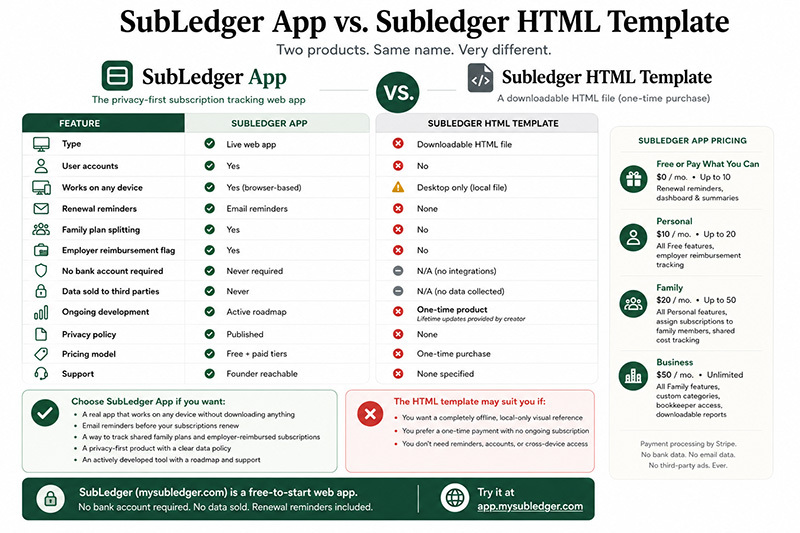
| Feature | SubLedger App | Subledger HTML Template |
|---|---|---|
| Type | Live web app | Downloadable HTML file |
| User accounts | ✅ Yes | ❌ No |
| Works on any device | ✅ Yes (browser-based) | ⚠️ Desktop only (local file) |
| Renewal reminders | ✅ Email reminders | ❌ None |
| Family plan splitting | ✅ Yes | ❌ No |
| Employer reimbursement flag | ✅ Yes | ❌ No |
| No bank account required | ✅ Never required | N/A (no integrations) |
| Data sold to third parties | ✅ Never | N/A (no data collected) |
| Ongoing development | ✅ Active roadmap | ❌ One-time product |
| Privacy policy | ✅ Published | ❌ None |
| Pricing model | Free + paid tiers | One-time purchase |
| Support | ✅ Founder reachable | ❌ None specified |
Which Tool Is Right for You?
Choose SubLedger (mysubledger.com) if you want:
- A real app that works on any device without downloading anything
- Email reminders before your subscriptions renew
- A way to track shared family plans and employer-reimbursed subscriptions
- A privacy-first product with a clear data policy
- An actively developed tool with a roadmap and support
The HTML template may suit you if:
- You want a completely offline, local-only visual reference
- You prefer a one-time payment with no ongoing subscription
- You don’t need reminders, accounts, or cross-device access
Sources
The following sources were used in the research and preparation of this article. SubLedger’s payment processing is handled exclusively through Stripe (stripe.com). SubLedger does not link to or store bank account information.
- SubLedger Subscription Management App: https://app.mysubledger.com
- Subledger HTML Template: https://takisathanassiou.com/lp-subscription-tracker-html/
- Subledger HTML Template: https://takis.gumroad.com/l/subledger-subscription-tracker
- Subledger HTML Template: https://payhip.com/b/4fM65
Start tracking your subscriptions in minutes
— no bank account required, no data sold, ever
TRY SUBLEDGER FREEFAQ
Are these two products related?
No. SubLedger (mysubledger.com) and the Subledger HTML template are separate, unrelated products that happen to share a name. They were created independently and have no affiliation with each other.
Which SubLedger was first?
The two products were developed independently and have no affiliation. SubLedger (mysubledger.com) was built during the Replit Agent 4 Buildathon in early 2026. The exact timeline of the HTML template's development is not known.
Does the SubLedger app require a download?
No. SubLedger (mysubledger.com) is a web app that works in any browser on any device. Nothing to download or install.
Does SubLedger sell my data?
Never. SubLedger’s only external integration is Stripe, used solely to process paid plan payments. No bank account data, no email data, and no behavioral data is sold to third parties.
Is SubLedger free?
Yes. SubLedger has a free tier that includes up to 10 subscriptions, renewal reminders, and full dashboard access. Paid plans start at $10/month for additional features and higher subscription limits.